Manage Google Drive Permissions for New Property Set Ups
1. Navigate to https://drive.google.com/drive/folders/0ANiL3aF-BfFnUk9PVA

2. Click "7 people"

3. Type in the email address you would like added to the group
4. Click the email address you are adding.

5. Click "cdmxmaint@bellairemultifamily.com"

6. Click "CDMX Manager"

7. Click "CDMX Assistant"
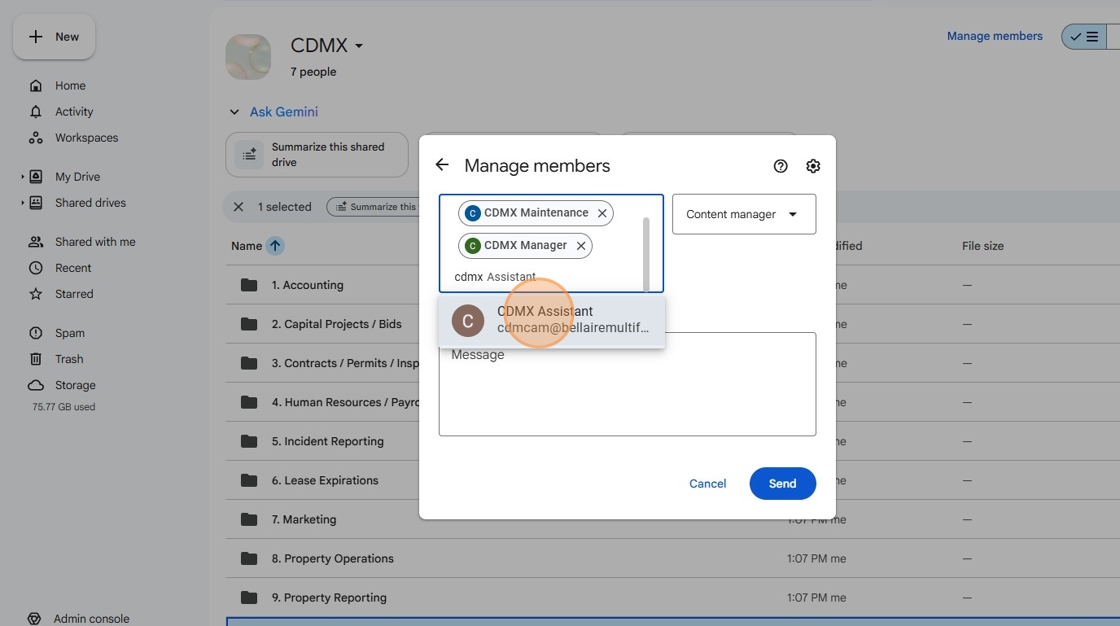
8. Click "Content manager"

9. Click "Add, edit, and share files" or Contributor Access. Property site teams get Contributor access to the property folder.

10. Click "Send"

11. Click "Shared drives"

12. Double-click "Bellaire Multifamily Property Team Drive"

13. Click "1 group · 67 people"

14. Type in the email address you would like to add.
15. Click on the email address you would like to add.

16. Click this button.

17. Click "Viewer" It is very important, all team members get VIEW only access to the property team drive.

18. Click "Send"

Was this article helpful?
That’s Great!
Thank you for your feedback
Sorry! We couldn't be helpful
Thank you for your feedback
Feedback sent
We appreciate your effort and will try to fix the article